Save the essentials, not just links to them
A confirmation email can contain a link that opens a web page. That is useful online, but it is not the same as a document stored on your phone. Open the actual ticket or confirmation and use the provider’s supported download or wallet option when available.
| Part of the trip | Keep available |
|---|---|
| Flight | Flight number, travel date, airports and the airline’s issued boarding pass when available. |
| Hotel | Full address, booking reference, contact number and check-in instructions. |
| Activities | Confirmation, meeting point, start time and provider contact details. |
| Car rental or transfer | Pickup location, confirmation, contact number and the provider’s collection instructions. |
| Getting around | Any offline map you have explicitly downloaded in your chosen mapping app. |
A screenshot can be a useful reference, but it may not work as an admission or boarding credential. Use the original pass or document in the format required by the airline or activity provider. Some passes or codes need the provider’s app.
Prepare an Offline Trip Pack in Atlas
Atlas keeps flights, stays, experiences and saved documents together on iPhone. Prepare an Offline Trip Pack while you have a connection, then open the saved information you plan to use. Add details manually: booking imports are temporarily unavailable.
Use the pack for the details you have saved. Do not assume it includes every linked website, an offline map or a fresh airline update. Keep your airline’s original ticket or boarding pass close as well.
Run a two-minute check before leaving
- Open your trip and the documents you will need while connected.
- Turn on Airplane Mode and make sure Wi-Fi is off for the check.
- Open the trip again. Check that you can read the hotel address, booking reference and essential documents.
- Try the airline’s boarding pass in its supported app or wallet. Check any provider-specific requirements in advance.
- Restore your connection. Save or download anything that was missing, then repeat the check for those items.
Do this before departure, while missing information is still easy to retrieve. An offline check is more useful than discovering at the destination that a saved item was only a web link.
Know which information can become stale
Flight status, terminals, gates and delays can change after a pack is saved. Atlas’s live flight updates, maps and place search need internet access. Once connected, refresh and compare the available information with your airline and the airport displays.
Hotel access instructions and activity arrangements can also change. Keep the provider’s contact details so you can ask about a late arrival or a different meeting point. An offline itinerary records your plans; it does not guarantee that the plan is still current.
Keep the trip useful after landing
Give yourself a short, practical arrival checklist: open the hotel address, review the next timed booking, and reconnect when possible for updates. Keep the phone charged and know where your original confirmations are stored.
If the itinerary itself needs organising first, start with our guide to organising a trip on iPhone.
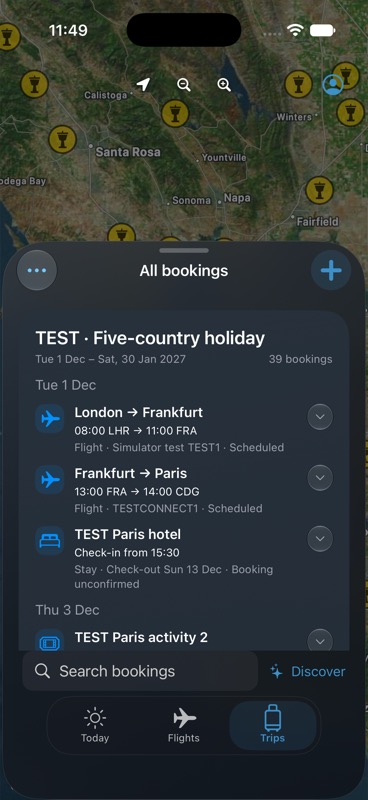
Synthetic example bookings; not a live travel feed.
Keep your next trip together.
Atlas is free for iPhone, with no subscription or in-app purchases. Up to 20 distinct new flights per account per UTC calendar month. Booking imports are temporarily unavailable.
Get Atlas on the App Store