1. Start with the arrival you actually booked
Write down the arrival airport, the date at your destination and the scheduled arrival time. Check the full date on an overnight journey: the day you leave home may differ from the day you arrive. Save the airline confirmation so you can compare your plan with the original booking.
Landing time is only one part of the arrival. You still need time to leave the aircraft, collect any checked luggage and complete the airport formalities that apply to your journey. An airport-to-hotel estimate begins somewhere in that process; it is not a promise that you will be at reception at a particular minute.
2. Ask the hotel two separate questions
Confirm when your room should be available, then ask whether the property can store luggage before that time. These are separate services. A hotel might hold bags without offering early room access, and some accommodation has no staffed reception at all.
Keep the answer with the address, booking reference and arrival instructions. If access depends on meeting a host or collecting keys elsewhere, record that meeting point separately from the address where you will sleep. Save a contact method that you can use while travelling.
“Room access from 15:00. Luggage storage confirmed by the property. Reception entrance on the side street. Recheck the instructions before leaving the airport.” Replace each detail with what your own accommodation has confirmed.
3. Give the gap a flexible shape
For example, a flight arriving at 09:30 and a hotel with check-in from 15:00 do not necessarily leave five and a half hours for sightseeing. First allow for the airport, the journey into town and finding the right entrance. Then decide whether a meal, a short walk or simply a rest makes sense.
Keep an unbooked idea separate from an activity with a ticket and a fixed start time. If you choose a timed booking, understand its provider’s late-arrival and cancellation conditions before paying. When your arrival is uncertain, a nearby idea can be easier to adjust.
4. Bring the flight and stay together in Atlas
Atlas is an iPhone travel organiser that keeps flights, hotel stays and experiences together. Add the flight and stay manually, compare the dates with your confirmations and save the hotel’s check-in time, address and useful notes. Today gives you a place to review what comes next.
Use any available arrival and hotel-travel estimates as planning aids. Flight coverage, updates and travel estimates can change. If your arrival shifts, review the gap again and contact the property when its instructions require it. Atlas does not change your hotel reservation or arrange early check-in.
Booking imports are temporarily unavailable. Keeping the manual summary accurate is part of preparing the trip; our iPhone itinerary guide covers the wider workflow.
5. Save what you need before landing
- Open the hotel confirmation and arrival instructions on your phone.
- Save the address, entrance or key-collection point and contact details.
- Check that any luggage arrangement was actually confirmed.
- Prepare your saved documents and Offline Trip Pack while connected.
- Keep a flexible first plan and enough phone battery to reach the property.
Test saved information before departure rather than relying on a link that might need internet. Live flight updates, maps and online services need a connection. Use the offline travel checklist for a practical test.
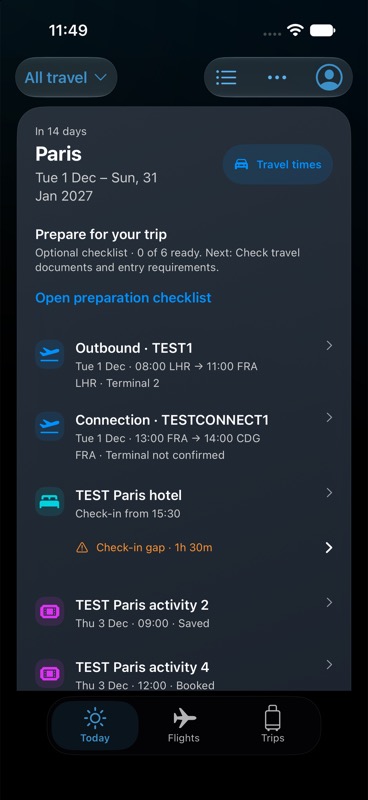
Synthetic example bookings; not a live travel feed.
Keep your next trip together.
Atlas is free for iPhone, with no subscription or in-app purchases. Up to 20 distinct new flights per account per UTC calendar month. Booking imports are temporarily unavailable.
Get Atlas on the App Store