1. Make a simple outline before adding detail
Start with one line for each place you will stay, including the arrival and departure dates. Add the journeys between them. At this stage you are checking the shape of the trip: whether the dates connect, whether a night is missing and whether each travel day has somewhere to end.
Use the place names written on your confirmations. A city can have more than one airport, and a property name alone may not identify the right address. Record the airport or station you actually booked alongside the destination you have in mind.
2. Treat each flight as its own entry
For a connecting journey, keep the individual flight numbers, dates and airports. Read the local dates on the airline confirmation, especially for overnight flights. Do not infer the arrival date from how many hours a journey feels as though it should take.
Keep the provider’s booking reference beside the journey it belongs to. If the bookings are separate, make that clear in your own notes. A summary in a travel organiser does not establish whether your provider treats two flights as one protected connection; check the actual booking conditions with the provider.
London → Paris: flight and two hotel nights. Paris → Rome: next journey and three nights. Rome → London: return flight. Under each transition, add the arrival date, the next accommodation and the original confirmation. This is an example structure, not a timetable or route recommendation.
3. Check the handover between stays
Check-out at the first property and check-in at the next may leave a gap. Note both times, the travel between places and any key-collection instructions. Ask the relevant property about luggage storage or an unusual arrival time instead of assuming it will be available.
Save the full address for each stay. If a transfer, rental vehicle or other journey is part of the plan, keep its reference and pickup details with the same travel day. Review the instructions from the provider for anything that needs advance confirmation.
4. Put fixed activities around the journeys
Add activities after the essential travel and stays are in place. Distinguish something you would like to do from a confirmed booking. A saved idea can move easily; a ticket with an entry time may have conditions you need to understand before changing the day.
Leave space around arrival and departure. A live flight estimate can be useful, but it cannot guarantee that you will reach a meeting point on time. Keep the activity’s original ticket, meeting point and provider contact available.
5. Review the sequence in Atlas
Atlas brings flights, stays, experiences and saved documents together on iPhone. Enter your bookings manually and use Today to see upcoming plans. Add hotel notes and any manually entered car-rental details alongside the journey. Booking imports are temporarily unavailable.
Before moving to the next city, review the next flight or journey, the next stay and the first fixed activity. Prepare saved details for offline use while you have a reliable connection. See our offline checklist for what to test.
Atlas is free, with an allowance of 20 distinct new flights per account per UTC calendar month. Deleting a flight does not restore a slot, and re-adding the same flight does not use another. Check the allowance before entering a large set of separate flights.
6. Keep one short review routine
- Check the destination’s local date against the original confirmation.
- Confirm the correct airport or other departure point.
- Open the next stay’s address and arrival instructions.
- Find the references and documents for the next transition.
- Update your summary when a provider changes the booking.
When a reservation needs changing, contact its provider. Editing your itinerary in Atlas updates the information you keep; it does not amend the underlying reservation. For the arrival gap in particular, read planning the time before hotel check-in.
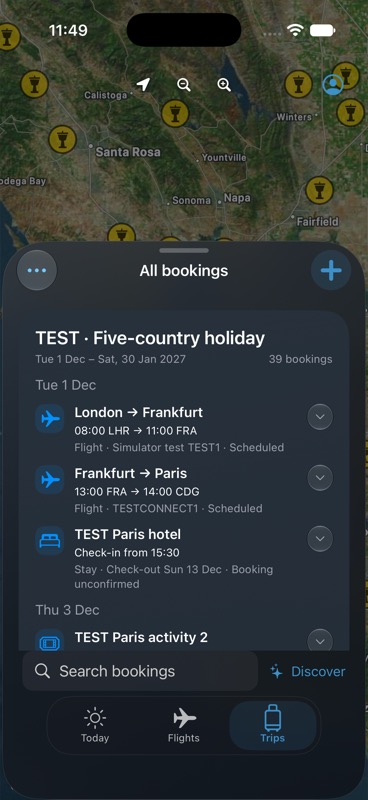
Synthetic example bookings; not a live travel feed.
Keep your next trip together.
Atlas is free for iPhone, with no subscription or in-app purchases. Up to 20 distinct new flights per account per UTC calendar month. Booking imports are temporarily unavailable.
Get Atlas on the App Store